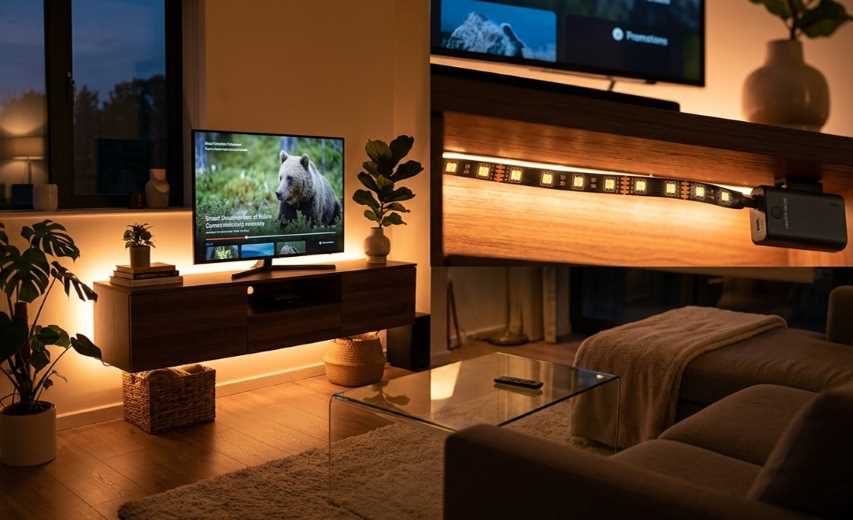
🤔 What Are Wireless LED Light Strips?
Wireless LED light strips are flexible, self‑adhesive lighting systems that can be controlled remotely without physical switches or dimmers. Unlike traditional strip lights that require a dedicated wall dimmer or inline controller, wireless models connect to a smartphone app, voice assistant, or RF remote, letting you change colors, brightness, and effects—all without touching the light itself.
A complete wireless setup typically includes four components:
Flexible LED strip containing dozens or hundreds of colored LEDs
Wireless controller (Bluetooth, Wi‑Fi, RF or Zigbee) attached to or embedded in the strip
Power supply, usually a plug‑in wall adapter (12 V or 24 V DC)
Mobile app or remote control that sends commands to the controller
At the heart of every wireless LED strip is a small radio module that listens for commands on a wireless channel. Most consumer models operate on the 2.4 GHz ISM band, using Bluetooth Low Energy (BLE, typically 4.2 or 5.0+), Wi‑Fi, or proprietary RF protocols. Bluetooth is common for shorter‑range, direct phone‑to‑strip communication, while Wi‑Fi allows the strip to be controlled from anywhere in the world via the cloud. Many premium strips now include both, offering the convenience of local Bluetooth control plus the remote access and smart‑home integration of Wi‑Fi.
✨ The Magic Behind Wireless Control
Understanding the basic communication chain helps explain why wireless strips feel so effortless.
- 📡 Short‑Range: Bluetooth (BLE)
Your phone communicates directly with the strip's BLE radio. Power consumption is very low, making BLE ideal for battery‑operated accessories, and pairing is simple – open the app, and the strip appears. Typical open‑field range is around 30 meters (about 100 ft). The downside? You need to be physically close to the strip to control it, and commands don't go through walls as reliably as Wi‑Fi. - 🌐 Long‑Range: Wi‑Fi (2.4 GHz)
The strip connects to your home Wi‑Fi network. Commands travel from your phone to the cloud and back down to the strip, so you can change colors from another country if you forget to turn the lights off before a holiday. Wi‑Fi also enables seamless integration with platforms like Alexa and Google Assistant. The trade‑off is higher power consumption and a slightly more involved setup process. - 📡 Open Standard: Zigbee
Zigbee is a low‑power wireless protocol designed specifically for smart home devices. Strips with Zigbee can participate in a mesh network, relaying commands from one device to another, which greatly extends range. The Philips Hue ecosystem is the most well‑known example. - 📡 The New Standard: Matter
Matter is a unifying, IP‑based connectivity standard backed by Apple, Amazon, Google, and others. Matter‑compatible wireless strips (like some Nanoleaf and SwitchBot models) work with any Matter‑enabled hub, regardless of brand, making setup and interoperability far simpler than in the past. - 📡 Simple RF Remote (2.4 GHz)
Some budget strips come with a dedicated RF remote (not Bluetooth or Wi‑Fi). The remote communicates directly with a tiny receiver module built into the strip's controller. No app, no pairing – just point and click.
🧩 Types of Wireless LED Light Strips
Choosing the right type of strip is the most important decision you'll make. Each technology produces a vastly different visual effect.
🌈 RGB (Red + Green + Blue)
The entry‑level wireless strip. It contains only red, green, and blue LEDs. By mixing these three colors, the strip can display millions of hues, but it can only display one single color at a time – the entire strip will always be a uniform shade. Great for general mood lighting, but limited for creative effects.
🎨 RGBIC (RGB + Independent Chip)
This is a major upgrade. "RGBIC" means the strip has an integrated control chip embedded at regular intervals, allowing segments or even individual LEDs to be controlled independently. An RGBIC strip can show a rainbow gradient, chase patterns, or "shooting star" effects that travel across the length of the strip. For dynamic, eye‑catching installations (gaming setups, TV backlighting, parties), RGBIC is the preferred choice.
✨ RGBICWW (RGBIC + Warm White + Cool White)
RGBICWW strips add dedicated warm‑white (typically 2700 K–3000 K) and cool‑white (approximately 6500 K) LED chips alongside the RGBIC color LEDs. This gives you far superior white illumination compared to mixing RGB to create white, which often looks slightly blue or magenta. RGBICWW strips are ideal for both vibrant color effects and clean, natural task lighting.
COB (Chip‑on‑Board)
COB strips pack hundreds of tiny LED chips extremely close together, then cover them with a continuous phosphor coating. The result is a smooth, dot‑free, uniform line of light that looks more like a neon tube than a string of individual LEDs. COB strips also typically have very high CRI (Color Rendering Index) values of 90+, meaning colors illuminated by the strip appear natural and accurate.
🧵 Neon Flex / LED Rope
A specialized variant of COB technology, neon flex strips are encased in a thick, flexible silicone sleeve that diffuses the light into a soft, even, 10 mm‑wide glow. They are designed to mimic traditional glass neon signs while being shatterproof, energy‑efficient, and bendable by hand.
🔑 Key Features to Look For
When choosing a wireless LED light strip, focus on these specifications to ensure you get the right product for your needs.
🔢 LED Density
LED density is measured in LEDs per meter (LEDs/m). A strip with 30 LEDs/m will show noticeable gaps between individual light points, suitable for indirect cove lighting. 60 LEDs/m is the standard for good color mixing and smoothness. 144 LEDs/m or higher (as seen on some COB strips) produces a continuous, dot‑free beam that feels like a solid line of light.
💡 Brightness (Lumens per Meter)
A useful brightness specification is lumens per meter (lm/m). For ambient mood lighting, 200–300 lm/m is comfortable. For task lighting under kitchen cabinets or near work desks, aim for 400 lm/m or higher. Many cheaper strips omit lumen figures entirely; be cautious of products that only provide "bright" as a qualitative description.
🎚️ Color Temperature (White Spectrum)
If you want realistic white light, look for strips that specify both warm white (around 2700 K) and cool white (6500 K) ranges. The WiZ Connected LED Strip, for example, offers a continuous color temperature range from 2700 K (cosy warm) to 6500 K (crisp daylight), giving you full flexibility for any activity.
💧 IP Rating (Water & Dust Resistance)
IP20: No water resistance. For indoor, dry locations only.
IP44: Splash‑proof. Suitable for bathrooms or near sinks if not submerged.
IP65: Protected against low‑pressure water jets. Suitable for outdoor use under eaves and for kitchen counter backsplashes that may be wiped down.
IP67/IP68: Fully submersible. For fountains, pools, or extreme outdoor exposure.
🔌 Power Supply and Connectors
Wireless strips typically run on 12 V or 24 V DC. 12 V is more common for shorter strips (under 10 m), while 24 V allows longer runs without noticeable voltage drop at the far end. Ensure the included power supply wattage is sufficient for the strip length – a 5 m, 60 LEDs/m strip typically consumes around 24 W to 36 W.
🏠 Popular Use Cases for Wireless LED Strips
The versatility of wireless LED strips makes them useful in nearly every room of the house.
TV Backlighting: Placing a strip behind the television reduces eye strain in dark rooms and makes the picture "pop." RGBIC strips with ambient light detection (matching screen colors) offer the most immersive experience.
Gaming Setups: RGBIC and COB strips are essential for creating the signature gamer aesthetic, with effects that pulse, cycle, or react to in‑game audio.
Under‑Cabinet Task Lighting: A simple warm‑white (2700 K – 3000 K) strip under kitchen cabinets provides excellent food prep illumination without shadows.
Bedroom Mood Lighting: Placed behind the headboard or along the top of the wall, strips create a relaxing, color‑adjustable atmosphere for unwinding or reading.
Outdoor Accents: Waterproof (IP65) strips can line deck stairs, patio railings, or garden pathways, adding safety and beauty.
Closet / Pantry Lighting: Motion‑activated strips (often battery‑powered) inside closets or pantries illuminate dark corners as soon as you open the door.
👍 Why Switch to Wireless? The Key Benefits
Still using a standard wall switch? Here is why upgrading to wireless LED strips is worth it.
Effortless Setup – No Electrician Required: Peel off the adhesive backing, stick the strip in place, plug in the power supply, and you are done. No wiring, no junction boxes, no permits.
Single‑App Control for Your Entire Home: With Bluetooth and Wi‑Fi, you can control every wireless strip in your home from a single smartphone app – even when you are away.
Voice Commands with Your Smart Speaker: "Alexa, turn the living room strip blue." "Hey Google, dim the kitchen lights to 20%." Most major brands work seamlessly with Amazon Alexa and Google Assistant.
Infinite Color and Effect Options: A typical smart strip can produce up to 16 million colors. Many apps also offer dozens of preset scene modes and "music sync" modes that make the lights dance to the beat of any song.
Scheduling and Automation: Set the strip to gradually brighten in the morning as a sunrise alarm, turn on at sunset, or dim to a night‑light setting at bedtime – all completely automatic.
Extremely Energy Efficient: LEDs convert most of their energy directly into light, generating very little heat. A wireless LED strip typically consumes less than 10 W per meter, a fraction of what an incandescent bulb uses for the same brightness.
🛠️ Installation Guide: Get It Right the First Time
Proper installation makes the difference between a professional, polished look and a messy, peeling disaster.
📏 Step 1: Measure and Plan
Before ordering, measure exactly where you intend to place the strip – under cabinets, behind a TV, along a wall corner. Account for corners, gaps, and the location of the nearest power outlet. Strips are typically sold in 2 m, 5 m, 10 m, and 15 m lengths. Many can be cut at designated cut lines if you need a shorter run.
🧹 Step 2: Clean the Surface Thoroughly
The pre‑applied 3M adhesive tape is strong, but it will not stick to dust, grease, or loose paint. Wipe the surface with isopropyl alcohol and let it dry completely before peeling the backing.
📏 Step 3: Lay Out the Strip Before Sticking
Temporarily place the strip along the desired path (leave the backing on) to ensure it reaches the end point and can navigate corners without kinking. Most strips are flexible on the horizontal plane but do not bend well sideways.
📍 Step 4: Use Mounting Clips for Longevity
While the adhesive is strong, gravity and heat will eventually cause sagging, especially on vertical surfaces. Supplement the adhesive with the included plastic mounting brackets (often small clear clips that screw or nail into the wall). Place a clip every 30 cm to 45 cm (12 – 18 inches). For outdoor or high‑humidity areas, consider using additional silicone‑rated adhesive or UV‑resistant cable clips.
🔌 Step 5: Connect and Power Up
Plug the controller into the strip (ensuring the arrow aligns with pin‑1 on the connector). Plug the power supply into the controller, then the wall. If the strip does not light up or behaves erratically, the connector orientation is likely reversed – unplug and try again.
🔧 Pro Tips for a Clean, Professional Installation
Corners: To turn a 90° corner, do not simply bend the strip sideways – it will eventually break the PCB. Use a corner connector adapter (sold separately) or cut the strip at the cut line, solder four short wires, and reconnect.
Hidden Power Supply: Place the bulky power supply inside a cabinet or behind furniture, then run only the thin, flat strip along visible surfaces.
Gap Coverage: When two strips meet end‑to‑end, a 1 mm‑2 mm gap can be clearly visible. Use aluminum joining channel (often sold as "LED strip channel") to hide the seam.
📱 App Setup and Pairing (Common Steps)
While every brand has its own app, the general process is quite similar.
Download the app: Govee Home, Philips Hue, Nanoleaf, Smart Life / Tuya, etc.
Create an account: Optional for Bluetooth‑only control, but required for Wi‑Fi and cloud features.
Power on the strip and ensure your phone's Bluetooth is enabled.
Tap "+" or "Add Device" in the app. The strip should appear within a few seconds.
For Wi‑Fi models: You will be prompted to select your home Wi‑Fi network and enter the password. The strip will connect to the internet.
Name your strip: Assign a room or location (e.g., "Living Room Strip") for voice control and easy identification.
If the strip does not appear, try these fixes: cycle power to the strip (unplug and re‑plug), turn phone Bluetooth off and on, or move the strip closer to the phone. For persistent issues, many manufacturers have a "manual pairing" mode – typically achieved by rapidly pressing a button on the controller.
🧼 Maintenance and Care
Wireless LED strips are largely maintenance‑free, but a few habits will keep them performing well.
Dust regularly: Use a microfiber cloth or a low‑pressure duster to prevent dust buildup, which can dim the light output over time.
Check adhesive annually: After a year or two, edges may begin to peel. Re‑apply additional double‑sided tape or mounting clips as needed.
Keep connectors dry: For IP65 outdoor strips, the connectors themselves often have a lower IP rating than the strip. Wrap connections with waterproof heat‑shrink tubing or weatherproof electrical tape.
Update firmware: Manufacturers release occasional firmware updates through the app to fix bugs, add features, and improve security.
🧭 Choosing the Right Strip: A Simple Guide
| If You Want… | Recommended Type | Why |
|---|---|---|
| Simple, single‑color mood lighting | Basic RGB (or just warm‑white) | Affordable, easy to set up, and sufficient for accent lighting. |
| Multiple colors at once on one strip (rainbow waves, chasing patterns) | RGBIC or RGBICWW | The integrated chips allow independent LED control, enabling complex, dynamic scenes. |
| Realistic white light for a home office or kitchen | RGBICWW or dedicated CCT (Correlated Color Temperature) strip | Dedicated white chips produce clean, natural illumination without the tint of mixed RGB white. |
| A smooth, continuous, dot‑free neon look | COB (Chip‑on‑Board) | Dense LED packing and a diffusing coating eliminate individual hotspots, creating a flawless line of light. |
| A true outdoor, weather‑proof installation | IP65‑rated strip with appropriate waterproof connectors | Protects electronics from rain, snow, and humidity. |
🔮 The Future: The Rapidly Growing Smart Lighting Market
The wireless LED lighting market is not just a passing trend – it is one of the fastest‑growing segments in home technology. According to recent industry reports, the smart LED strip lights market was valued at US 5.12 billion in 2025 and is projected to reach 12.34 billion by 2032, growing at a compound annual rate of over 13%.
This explosive growth is fuelled by falling component costs, the widespread adoption of smart home voice assistants, and consumer demand for highly customizable, energy‑efficient lighting.
🏁 Cut the Cord, Unleash the Light
Wireless LED light strips have evolved from a niche gadget into a versatile, practical, and affordable solution for transforming any space. Whether you want to boost your gaming setup with dynamic RGBIC effects, add functional under‑cabinet lighting to your kitchen, or create a cosy, color‑adjustable atmosphere in your bedroom, there is a wireless strip designed for the job.
The combination of easy peel‑and‑stick installation, intuitive smartphone app control, and seamless voice integration with Alexa and Google Assistant makes them accessible to virtually anyone – no electrician, soldering iron, or technical degree required.
Cut the cord, download the app, and let your creativity – not your light switch – guide your home's illumination.
 |  |  |
 |  |  |