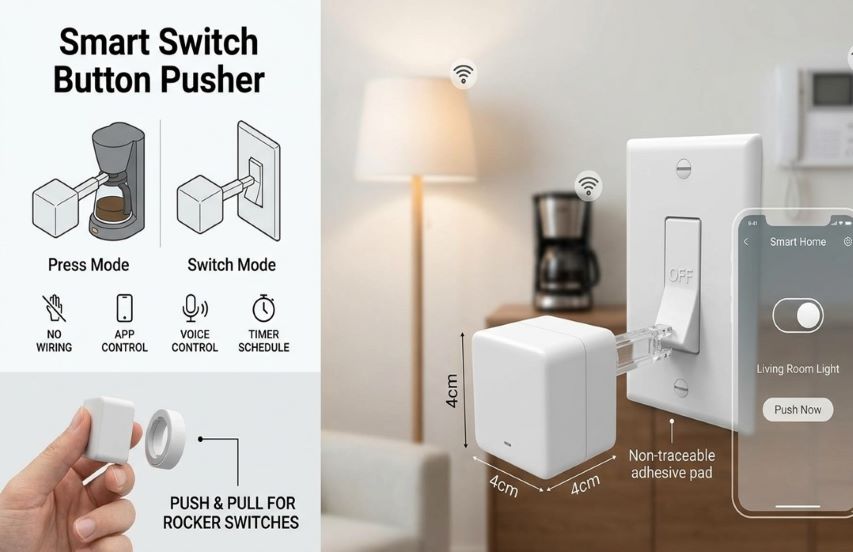
🤔 What Is a Smart Switch Button Pusher?
A Smart Switch Button Pusher (also called a robotic finger, button pusher, or fingerbot) is a small, wireless device that physically presses or flips physical buttons and switches on your behalf, using a motorized arm. It lets you add remote and automated control to almost any appliance without any rewiring or permanent modification.
Simply stick the device next to a switch or button using strong adhesive tape, connect it to a mobile app, and you can trigger it from anywhere — with your phone, voice command, or a preset schedule.
✨ Why You Need One: The Core Benefits
🧠 Zero Wiring or Renovations – No tools, no rewiring, and no damage to walls. It is a completely reversible plug‑and‑play solution.
🎮 Control from Anywhere – Trigger the pusher via Bluetooth from anywhere in your home, or use a compatible hub for remote access from outside your house.
⏱️ Smart Scheduling – Set timers to automatically turn devices on/off at specific times of day, or sync with sunrise/sunset.
🗣️ Voice Control Ready – Works with Amazon Alexa, Google Assistant, Apple Siri (with a compatible hub) for hands‑free operation.
🔗 Seamless Home Automation – Integrate with routines that link multiple devices (e.g., turn on humidifier + monitor humidity sensor).
🤖 Removes Repetitive Manual Tasks – Let a robotic finger handle daily button pushes while you focus on more important things.
🧩 Types of Smart Button Pushers
| Type | How It Connects | Best For | Key Characteristics |
|---|---|---|---|
| Bluetooth‑Only | Direct to phone via BLE | Single‑room control, basic timers | No hub required; short range (approx. 10 m); app & schedule only. |
| Zigbee | Connects through a Zigbee hub | Whole‑home mesh networks, low power | Reliable mesh, lower power consumption, requires hub |
| Wi‑Fi + Hub (SwitchBot style) | 2.4 GHz to proprietary hub | Cloud & voice assistant integration | Needs manufacturer’s hub for remote access, IFTTT, voice control |
| DIY / Open Source | Custom (ESP8266, servo) | Tinkerers, unlimited customization | Fully programmable; uses Alexa, Home Assistant, or MQTT |
| SmartThings / Matter | Compatible with universal hubs | Cross‑platform ecosystems | Works with multiple brands (requires Matter‑enabled hub) |
⚙️ Key Features to Look For
Battery Life & Type – Some models use replaceable CR2 batteries (up to 600 days), while newer versions offer built‑in rechargeable cells with USB‑C ports. Rechargeable units simplify long‑term maintenance.
Compatible Switches – Look for models that handle rocker, toggle, and momentary button types. The best products include multiple tool arms for different switch geometries.
Operating Modes – Supports press mode (single push), switch mode (push‑on/push‑off), and custom mode for long presses or hold durations.
Hub Requirement – Bluetooth‑only operation works locally; for voice assistants, remote access, or IFTTT, you will need a compatible hub.
Size & Aesthetics – Typical dimensions are around 43 x 37 x 24 mm (approx. 1.7 x 1.5 x 1 inches) and weight 40 g. Compact and discreet.
Easy Installation – Should include a 3M adhesive pad for simple attachment without damaging surfaces. Installation generally takes less than 5 minutes.
📝 Step‑by‑Step Setup & Installation
Clean the Surface – Wipe the area where you plan to mount the device.
Position the Device – Place it right next to the button or switch. Ensure the robotic arm can reach the target.
Adjust the Arm – If needed, extend or adjust the arm so it hits the button correctly.
Secure with Adhesive – Peel off the protective backing and press firmly. For stronger hold, use the included 3M adhesive strip.
Connect to the App – Open the appropriate app (Smart Life / Tuya / SwitchBot), enable Bluetooth, and follow the pairing instructions.
Calibrate Mode – Set the arm's movement to press, switch, or custom mode (press & hold). Adjust amplitude as needed.
Test the Action – Manually trigger the pusher from the app to confirm correct placement.
Configure Automation – Set schedules, timers, sunrise/sunset triggers, or integrate with voice assistants (requires a hub).
🧠 Where Can You Use a Smart Button Pusher?
Device / Switch | How It Helps |
|---|---|
| Lights – Old rocker or toggle wall switches | Automate on/off by schedule, sunrise/sunset, or voice command |
| Coffee Maker | Start brewing from bed in the morning |
| Humidifier / Air Purifier | Run only when humidity drops below a set level |
| PC or Laptop Power Button | Remote boot for work or backups |
| Garage Door Opener | Add smart control to a non‑smart opener(garage door) |
| Electric Water Heater / Fan | Schedule operation to save energy while away |
| Reset Button on Router | Reboot network equipment remotely |
| Xbox or TV | Turn on/off older entertainment devices as part of a routine |
| Dehumidifier / Exhaust Fan | Trigger when a paired humidity sensor exceeds threshold |
| Emergency Alert Button | Press a help button via automation for elderly or disabled users |
🧑🔧 Buying Guide: How to Choose the Right Model
Bluetooth‑Only – Best for budget and simple local control. No hub needed, but no remote/voice access.
Zigbee or Wi‑Fi (with Hub) – Ideal if you already have a smart home hub (e.g., SmartThings, Home Assistant, Alexa ecosystem) and want full integration.
Prefer Rechargeable – Look for models with built‑in USB‑C charging to avoid disposable batteries. The 2026 SwitchBot Bot Rechargeable is a prime example.
Tool Arms Included – Ensure the product comes with multiple attachments for different switch types (rocker, toggle, button).
App Quality – Read user reviews about the companion app (e.g., Smart Life, Tuya, SwitchBot). A buggy app can ruin the experience.
Power and Hub Cost – Compare total cost. A 26 pusher might need a 36 hub for voice control, while a $33 rechargeable model might work with a hub you already own.
🔮 The Future of Smart Switch Pushers
The market for these devices is growing fast. The global smart switch market, which includes button pushers as a retrofit segment, was valued at US 5.12 billion in 2025 and is projected to reach US 12.34 billion by 2032, growing at a CAGR of over 13%.
Key trends include:
Rechargeable Batteries – Newer models are shifting away from disposable cells to built‑in rechargeable lithium batteries (SwitchBot Bot Rechargeable).
Matter Compatibility – Expect more pushers to support the universal Matter protocol for cross‑platform connectivity.
Precision & Quiet Operation – Improved motors offer quieter, more accurate presses with adjustable force.
Longer Battery Life – Advancements in low‑power electronics will extend recharge intervals to 9–12 months per charge.
DIY & Open Source – Hobbyist projects using ESP8266 or Raspberry Pi Pico are growing, offering customizability.
🙋♀️ Frequently Asked Questions
Can I use it outdoors? – Most are designed for indoor use only, with no IP water‑resistance rating. Keep away from moisture.
Will it damage my walls? – No. The devices attach with removable 3M adhesive strips. No drills or permanent marks.
How long does the battery last? – Non‑rechargeable models: up to 600 days (two presses/day). Rechargeable: approx. six months (one press/day). Larger devices may last over a year.
Do I need a hub? – For local Bluetooth control and basic schedules, no. For remote access, voice commands, or integration with Alexa/Google Home, you need a compatible hub.
Can one pusher control two buttons? – Not directly. A single unit is meant for one button or a rocker switch. Some models support switch mode, which moves the arm in and out to flip a rocker switch both on and off.
Is it safe for pet or child access? – The exposed arm could be a curiosity risk. Place out of easy reach or behind furniture.
Will it work with my touchscreen device? – No. These devices are designed for physical switches only, not capacitive touchscreens.
🏁 Your First Step Toward a Smarter Home
A Smart Switch Button Pusher is one of the most affordable and approachable ways to begin building a smart home ecosystem. It requires no rewiring, no professional installation, and no permanent modifications—just a few minutes of setup and a healthy dose of imagination.
Whether you want your coffee maker to start brewing before you even get out of bed, your garage door to respond to your voice command, or your entire movie room to turn on with a single routine, a tiny robotic finger can make it happen.
With prices starting as low as 26 for a basic model and rechargeable options available for 34–$40, there is little reason to keep wrestling with manual buttons in a world that runs on automation.
Pick the model that fits your needs, stick it onto the switch you most want to automate, and let the robotic finger do the clicking while you enjoy the convenience.
 |  |  |
 |  |  |